![Logo_horizontal white.png]](https://help.rinsed.com/hs-fs/hubfs/Logo_horizontal%20white.png?height=29&name=Logo_horizontal%20white.png)
The purpose of the Active Members dashboard is to provide a view of how many active members you have. We display overall active member counts, counts at each location, and growth over time.
Multiple Definitions
We now offer two definitions of Active Members: the POS definition (as your Point-of-Sale (POS) defines it), and the Rinsed definition.
We have the POS definitions available for the following POS: DRB (SiteWatch), ICS (WashConnect), Patheon, and Sonny’s.
If you have multiple POS, we use each location’s respective definitions, and total them up. For example, if you have 1 DRB SiteWatch site and 1 ICS site, we will use DRB’s definition of Active Members for the DRB site, the ICS definition for the ICS site, and simply add them together for the totals charts.
Rinsed Definition of Active Members
The Rinsed definition of Active Members is:
The number of members who have had a successful sale or recharge within the recharge cadence outlined by their plan.
For example, if a member is on a 6 month plan, they will be considered active using the Rinsed definition of Active Members if they have successfully purchased a plan or recharged in the last 6 months.
Please note that historically (pre-June 2025), we did not account for non-monthly plans in our Rinsed definition of active members, and only looked at members who had had a successful sale or recharge within the last trailing month. Now, non-monthly (6 month, annual, etc) plan members are included in our active members definition.
The advantage of using the Rinsed definition for active members includes:
- If you use multiple POS, we offer a standardized definition that can help you accurately compare active member counts at various sites.
- Our definition is based off recent activity (sales and recharges) instead of statuses that can sometimes be stale
The Bridge
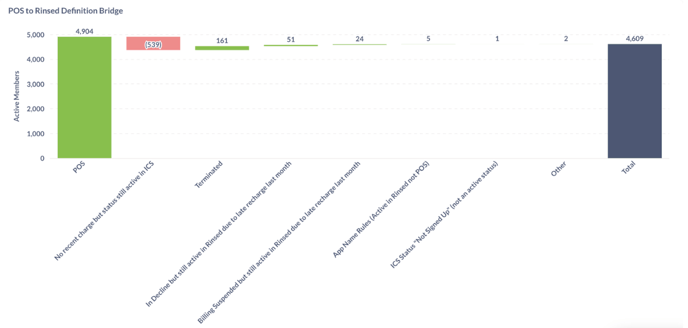
At the bottom of the dashboard, we have included an “Active Members Bridge.” The Bridge breaks down the differences between the number of active members as defined by the point-of-sale (POS) and Rinsed. The goal is to explain why some members are included as active in either the POS or in Rinsed, but not the other.
On the left, we show the active member count in the POS. On the right, we show the active member count in Rinsed. The buckets in the middle show the reasons why the member is considered active using one definition but not the other. If the bucket is red, they are active in the POS but not Rinsed. If the bucket is green, they are active in Rinsed but not the POS (with the exception of the POS bucket to the far left).
For example, in the image below, 539 members are active in the POS but not in Rinsed because there has been no recent charge, but their status in ICS is still active. 161 members are active in Rinsed but not the POS because they have been Terminated recently.
FAQs
Why is my POS active member count in Rinsed not exactly the same as what’s in my POS portal?
We refresh our active member counts once daily, overnight. Intraday changes to active member statuses are not reflected in Rinsed until the next day, which can lead to slight differences between the “POS Active Member Count” and the active member count in your POS portal.
Why don’t I have a dropdown with the option to select POS or Rinsed definition?
If you have any sites on NXT, Micrologic, or Washify, you will only have access to the Rinsed definition of active members, as we don’t yet have the ability to report on your POS’s definition of active members.
Why does Rinsed count “Terminated”/“Suspended”/“Cancelled” members as active?
In each POS, a member is considered inactive the minute they cancel their membership. However, in Rinsed, they are considered active until the end of their billing cycle, since they still have the ability to wash until this date. For example, if a member usually recharges on the 1st of the month, and decides to cancel on the 20th. They will be considered inactive in the POS starting on the 20th, but active in Rinsed until the 1st of the next month.
Why are members in decline counted in the Active Members Over Time Chart?
DRB considers members in decline to be active, so they are included in our dashboard under active when using the “POS definition” for DRB sites only.
Why are the date ranges different when I select POS definition versus Rinsed definition?
For Sonny’s customers, we show your Rinsed definition of the active member count from the day you were onboarded into Rinsed and beyond. We show your POS definition of active member count prior to that date.